Transforms in Pycairo - rotate
Categories: pycairo
We have previously seen how to use translate and scale in Pycairo, to draw items in different positions on the page. In this article we will see how to use rotation to draw items at different angles.
Default user space
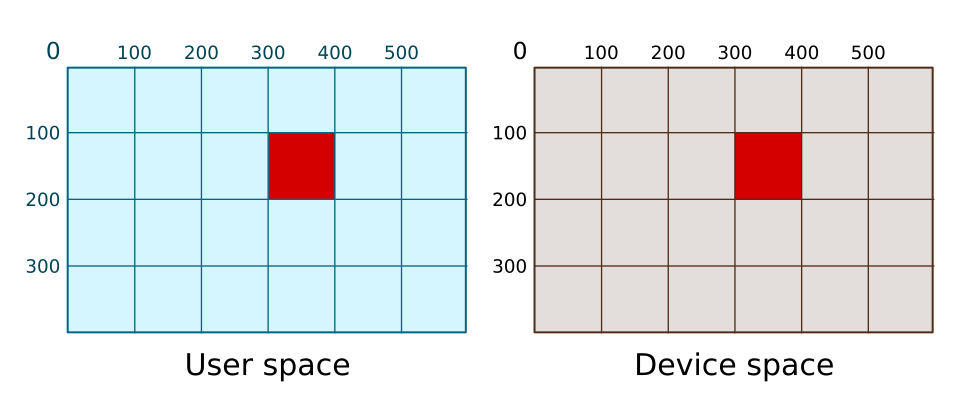
Here is our initial square in default user space, with no transform applied.
ctx.rectangle(300, 100, 100, 100)
ctx.set_source_rgb(0, 0, 1)
ctx.fill()
This defines the rectangle in user space. Pycairo then draws the square in device space. Because of the default mapping, the square is drawn at exactly the same size and place in device space:
Angles - radians
Like many graphics libraries, Pycairo measures angles in radians rather than degrees. You can convert from degrees to radians by multiplying by pi/180.
So, for example, 20 degrees is equal to 20*pi/180 radians (ie about 0.35 radians).
Rotating
The rotate function rotates user space. Here is an example:
ctx.rotate(20*math.pi/180)   # 20 degrees
ctx.rectangle(300, 100, 100, 100)
ctx.set_source_rgb(0, 0, 1)
ctx.fill()
This rotates user space by a 20 degrees. The whole of the user space is rotated. The centre of rotation is the point (0, 0).
Here is how the square is drawn using the rotated user space:
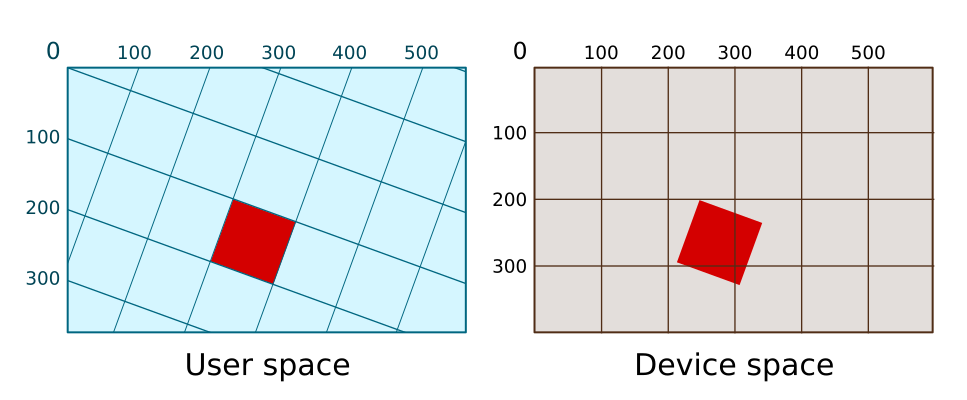
The shape drawn is still a square, 100 pixel wide, but it is no longer aligned with the device space axes because it has been rotated.
Related articles
Join the GraphicMaths/PythonInformer Newsletter
Sign up using this form to receive an email when new content is added to the graphpicmaths or pythoninformer websites:
Popular tags
2d arrays abstract data type and angle animation arc array arrays bar chart bar style behavioural pattern bezier curve built-in function callable object chain circle classes close closure cmyk colour combinations comparison operator context context manager conversion count creational pattern data science data types decorator design pattern device space dictionary drawing duck typing efficiency ellipse else encryption enumerate fill filter for loop formula function function composition function plot functools game development generativepy tutorial generator geometry gif global variable greyscale higher order function hsl html image image processing imagesurface immutable object in operator index inner function input installing integer iter iterable iterator itertools join l system lambda function latex len lerp line line plot line style linear gradient linspace list list comprehension logical operator lru_cache magic method mandelbrot mandelbrot set map marker style matplotlib monad mutability named parameter numeric python numpy object open operator optimisation optional parameter or pandas path pattern permutations pie chart pil pillow polygon pong positional parameter print product programming paradigms programming techniques pure function python standard library range recipes rectangle recursion regular polygon repeat rgb rotation roundrect scaling scatter plot scipy sector segment sequence setup shape singleton slicing sound spirograph sprite square str stream string stroke structural pattern symmetric encryption template tex text tinkerbell fractal transform translation transparency triangle truthy value tuple turtle unpacking user space vectorisation webserver website while loop zip zip_longest